How to make leash sleeves
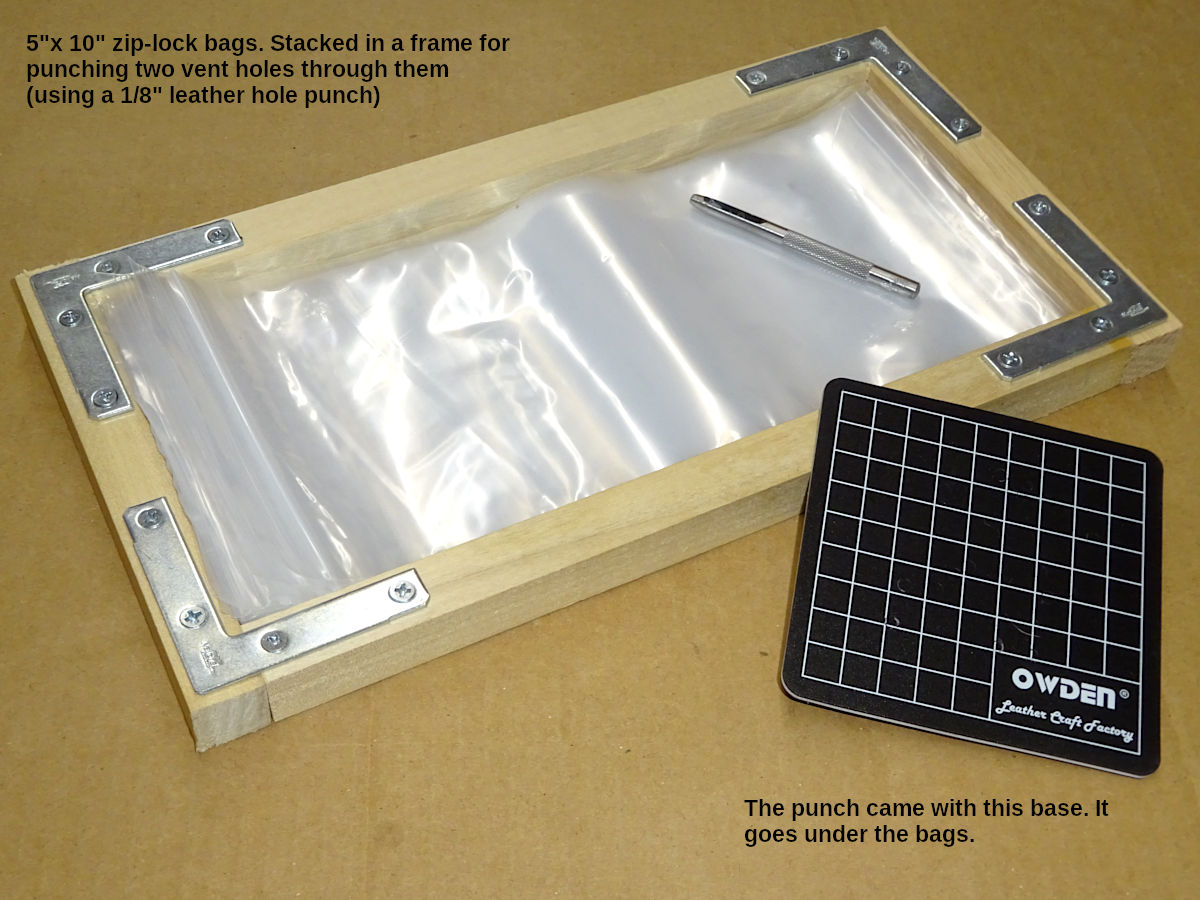
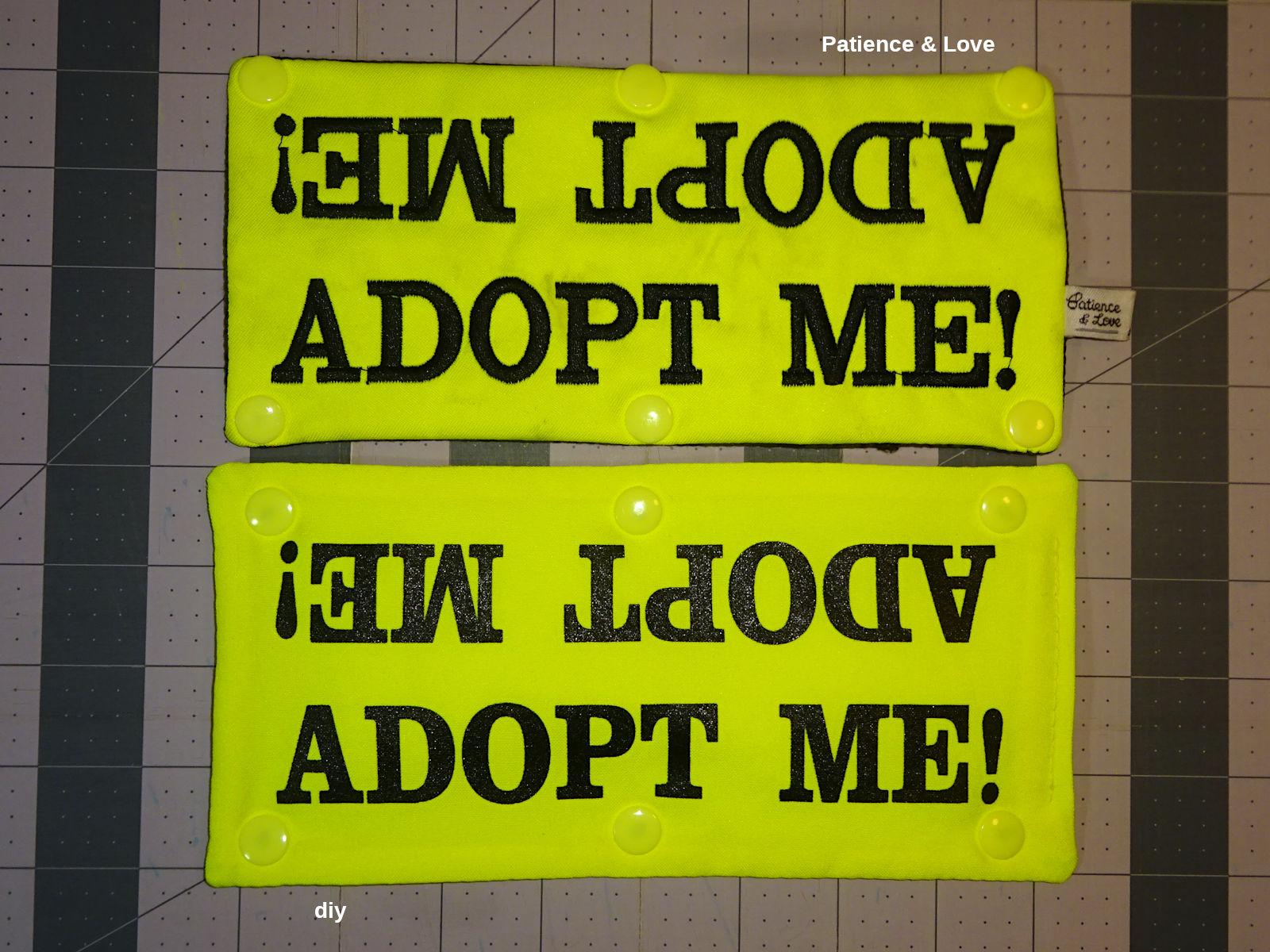
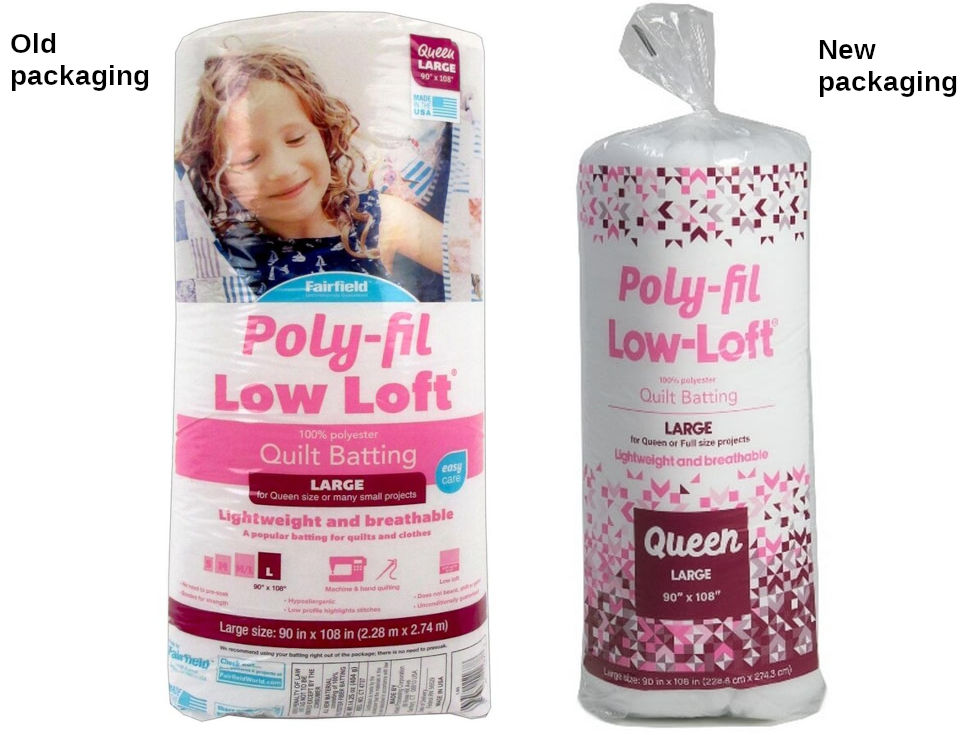
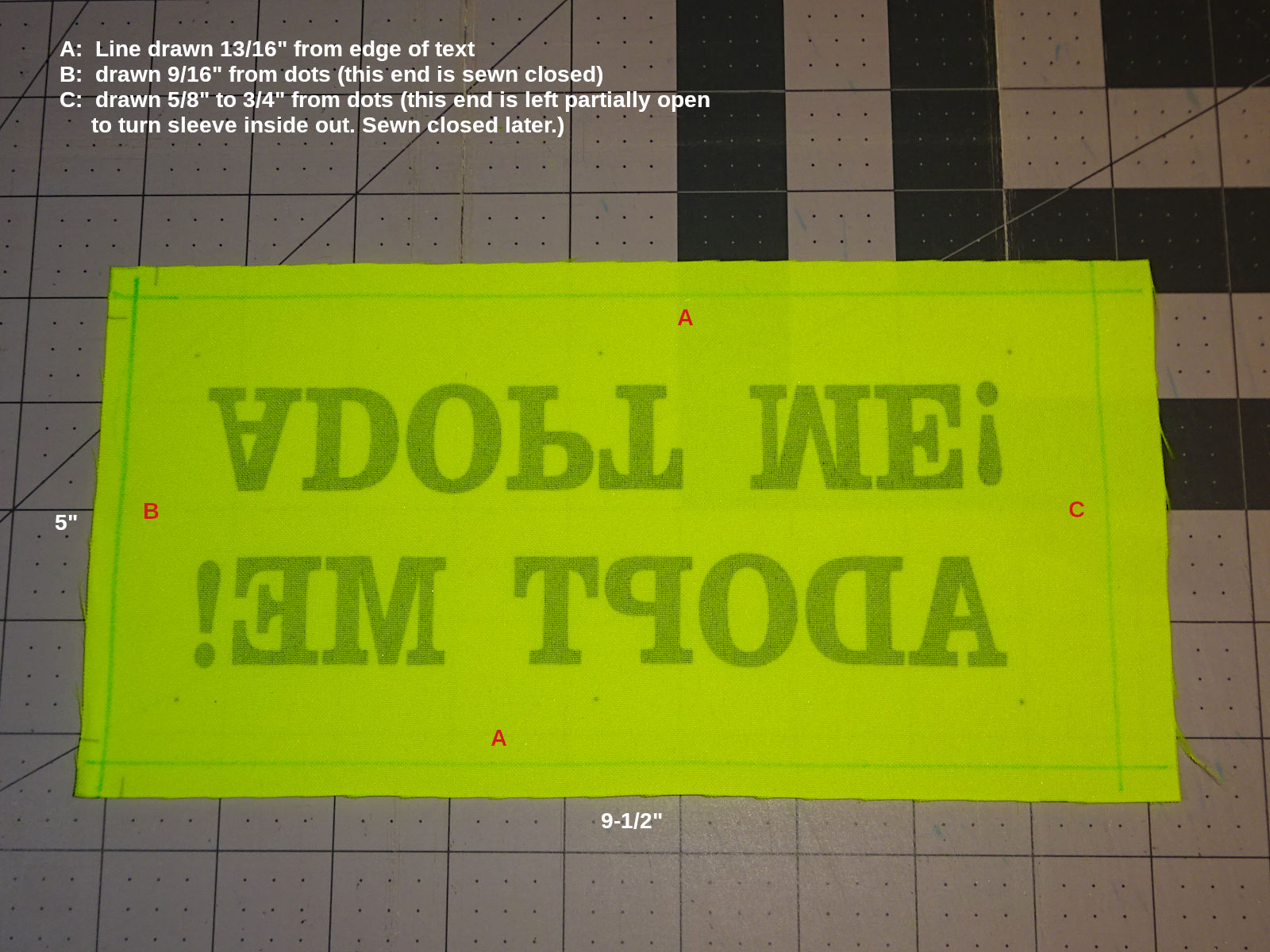
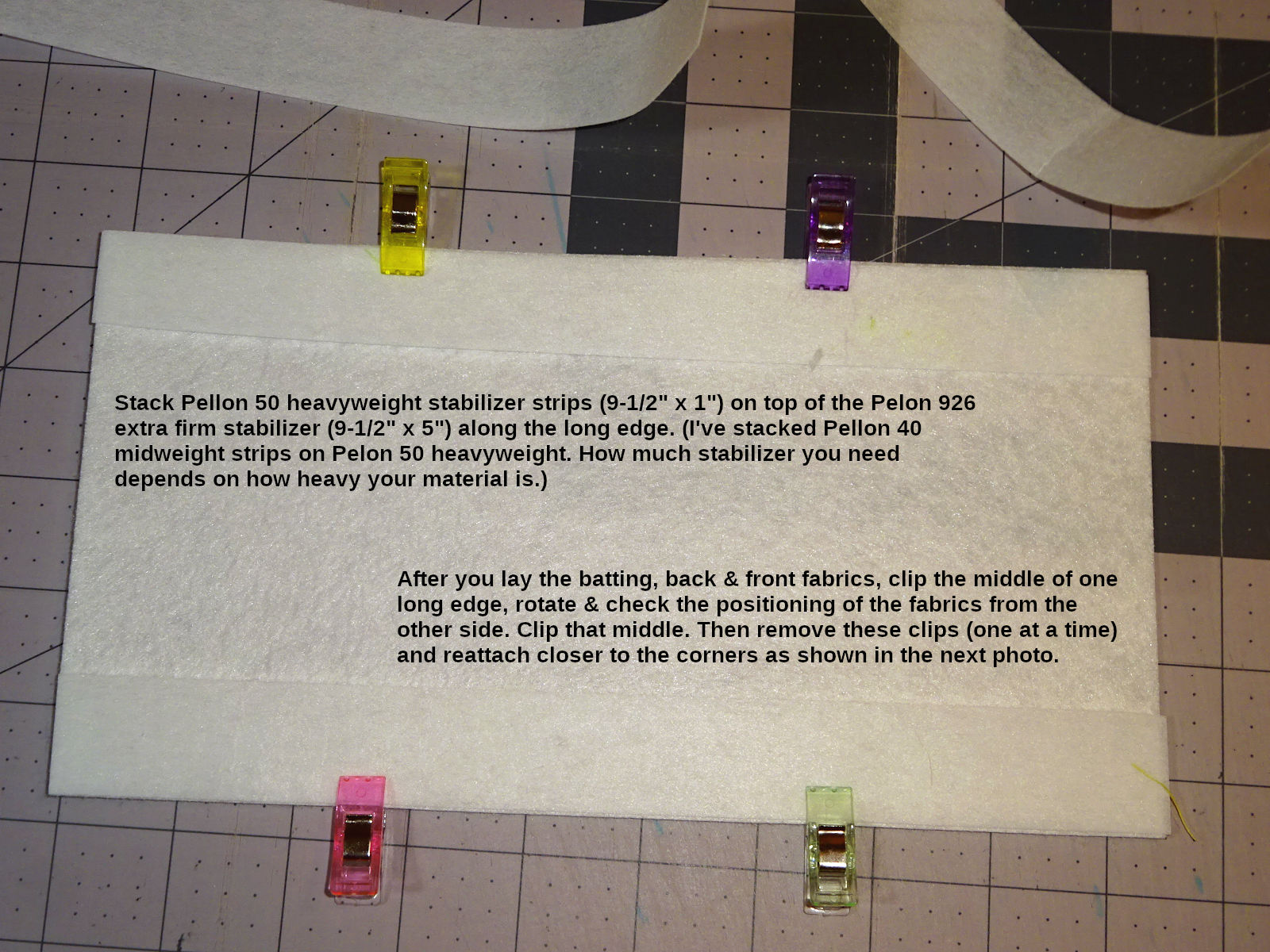
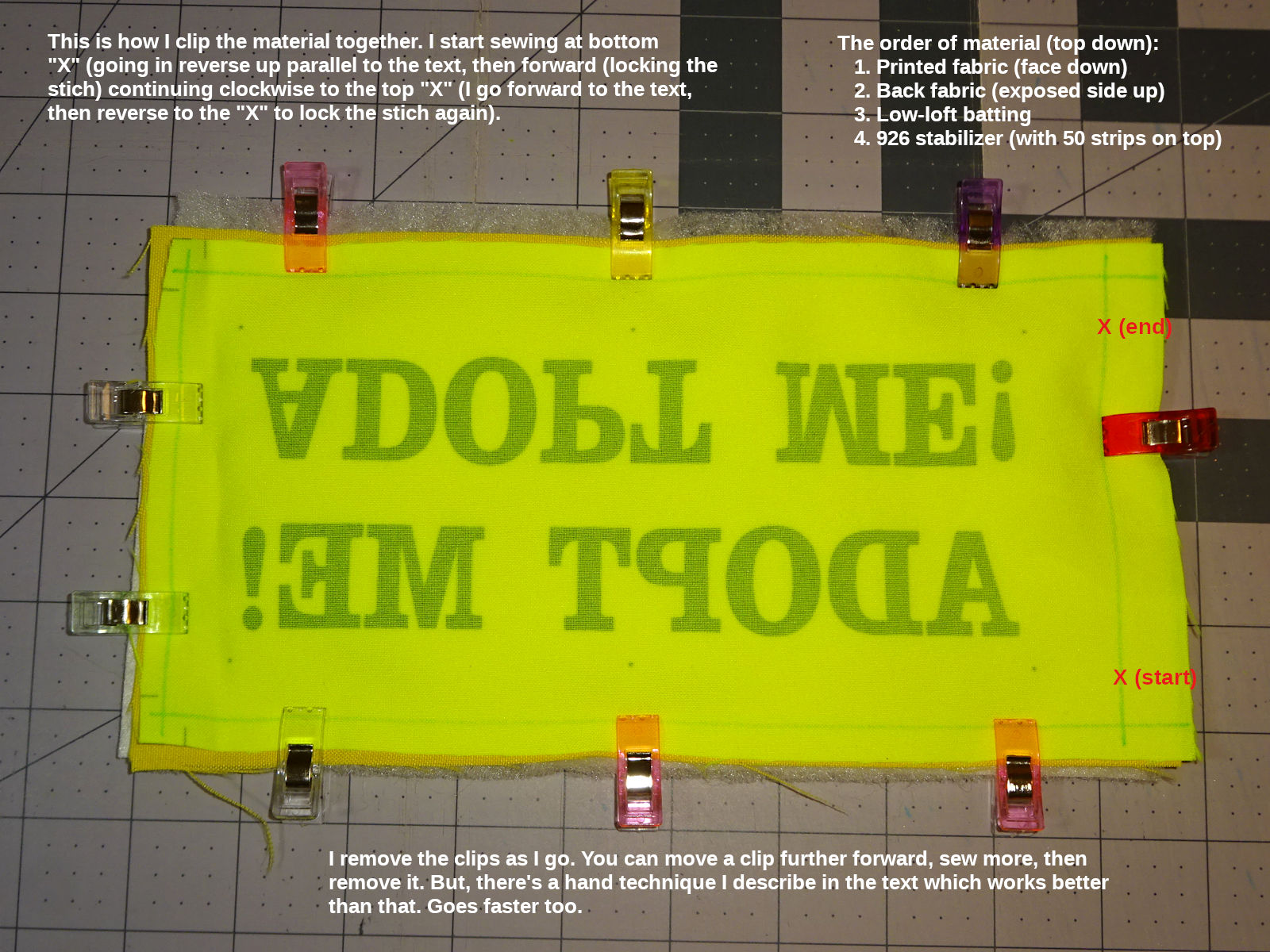
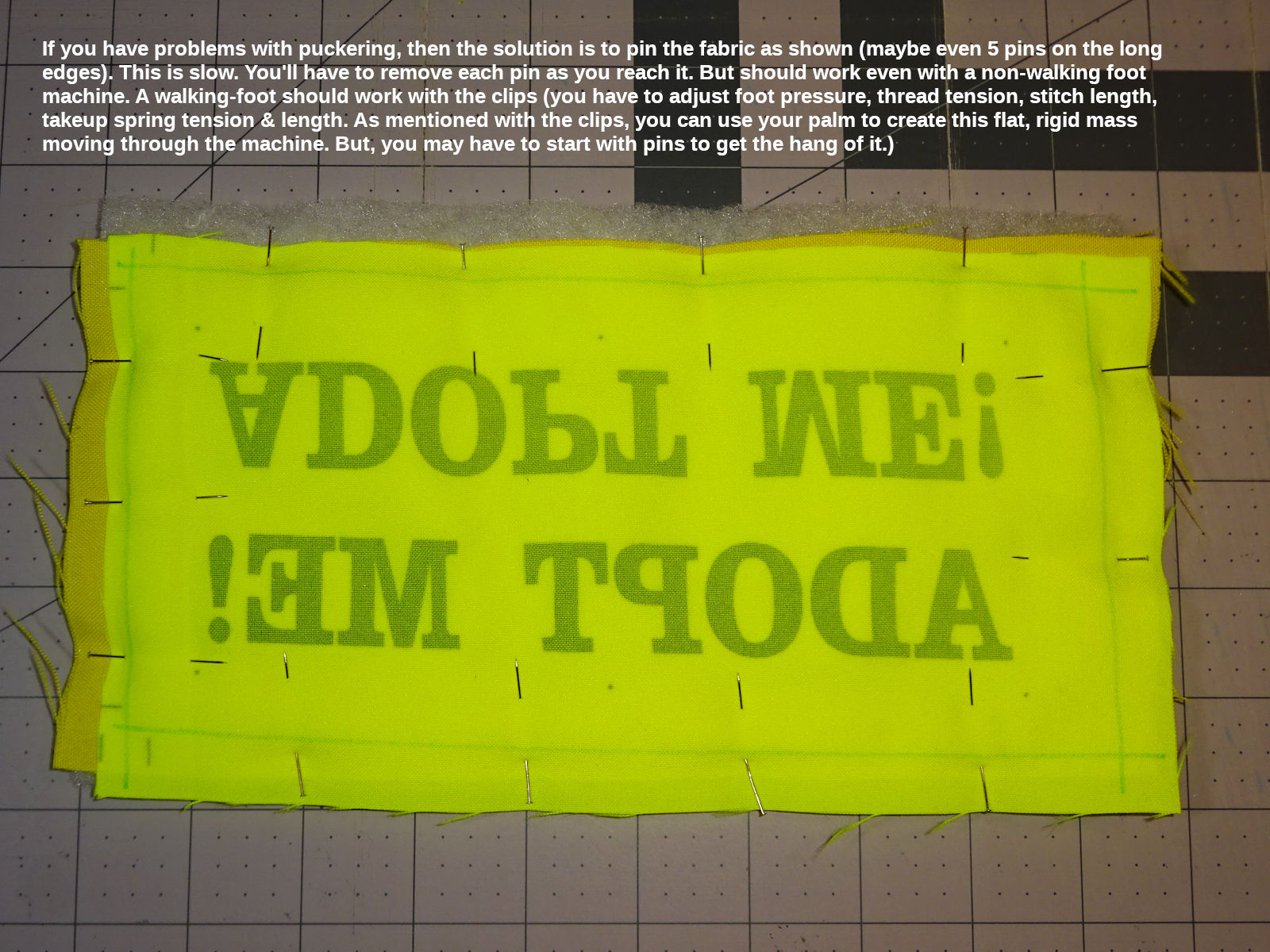
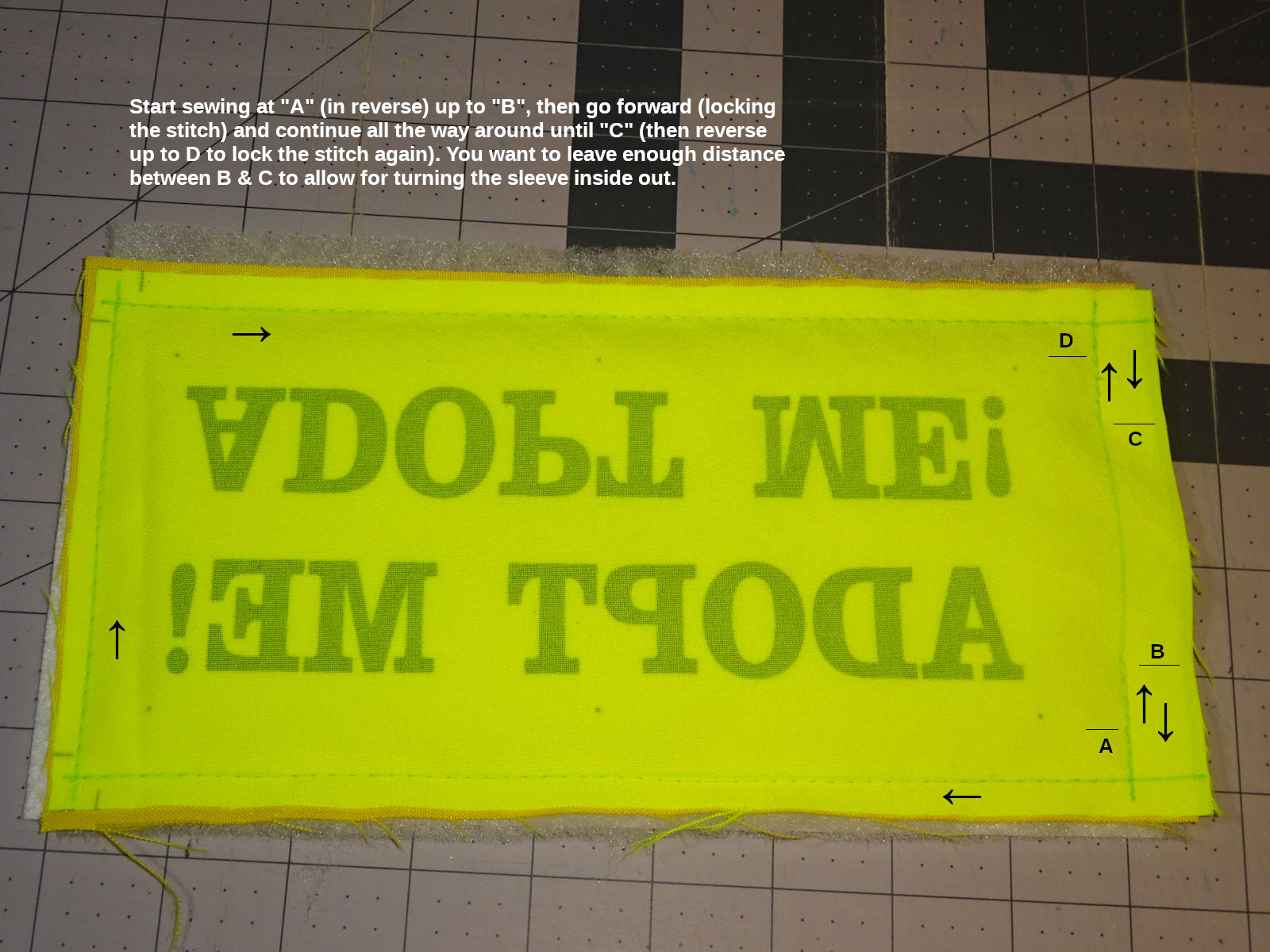
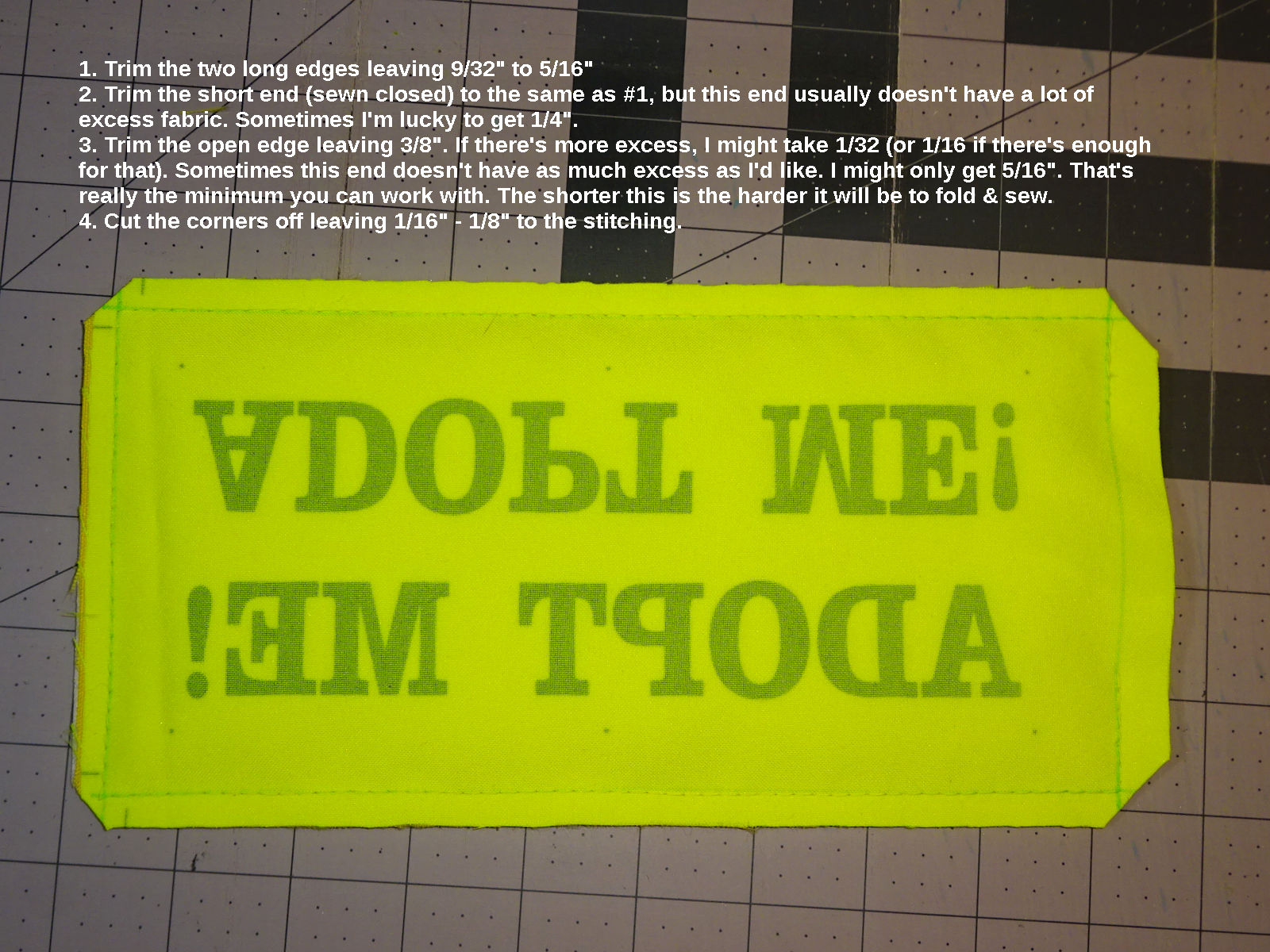
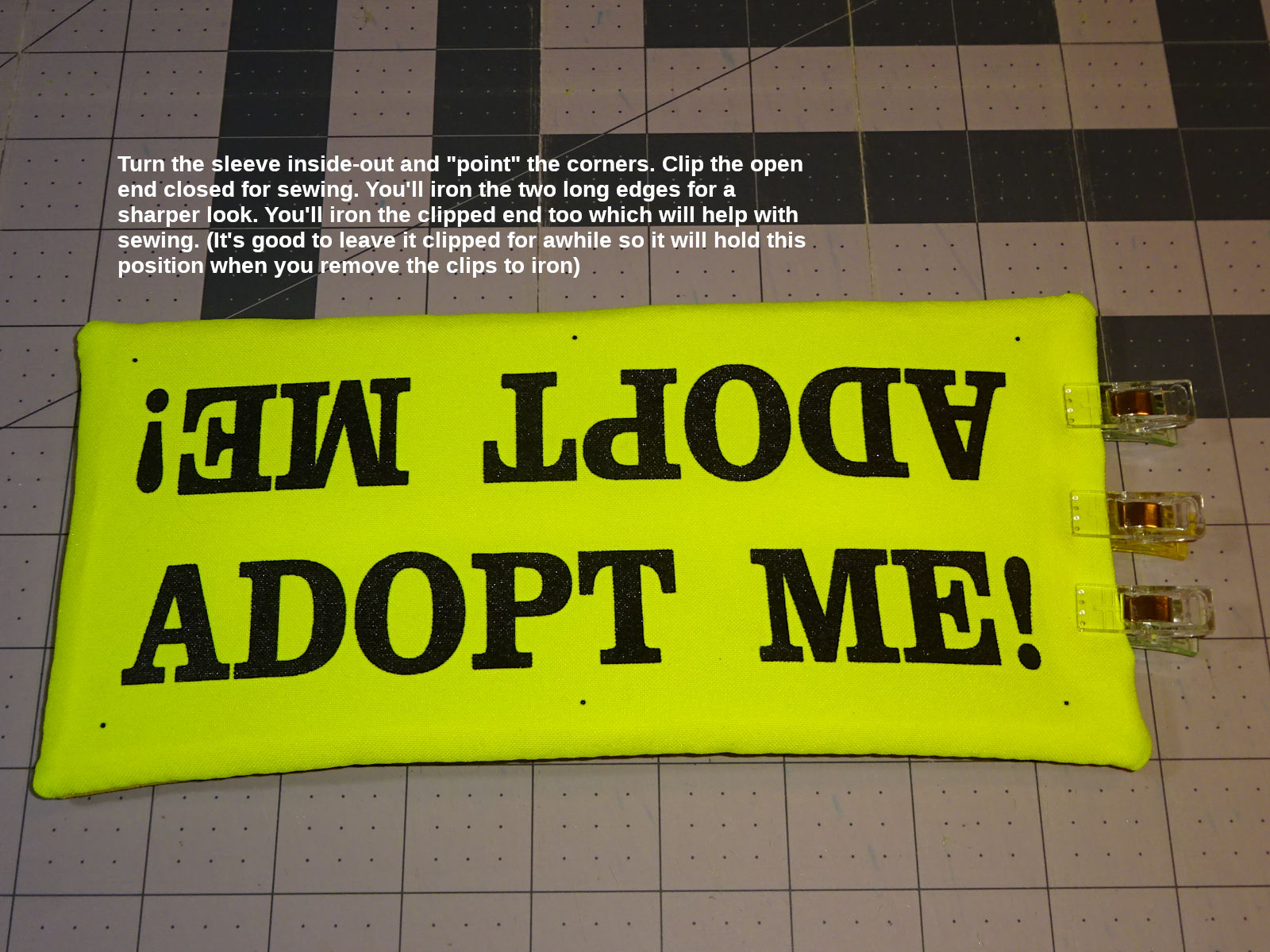
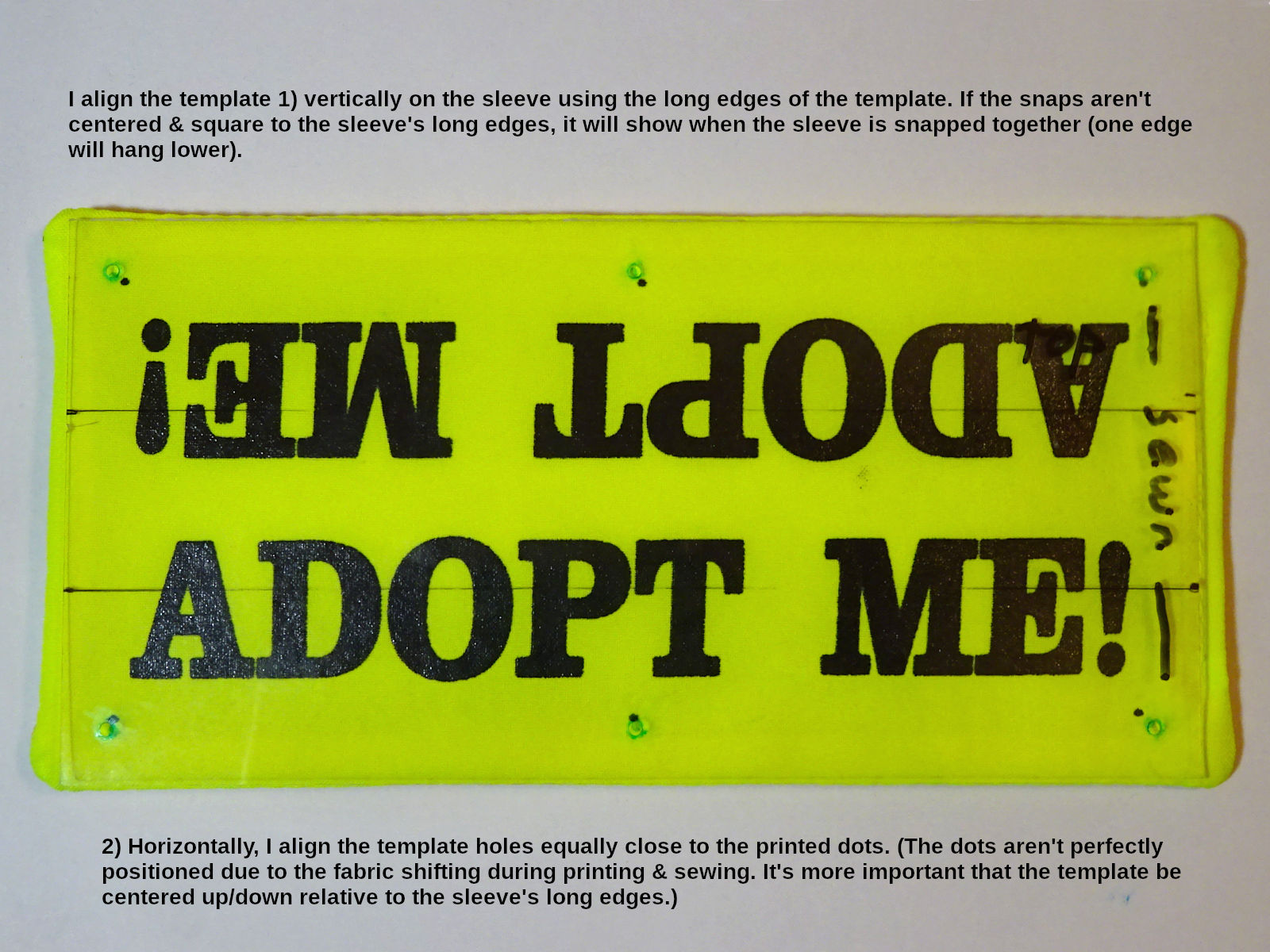
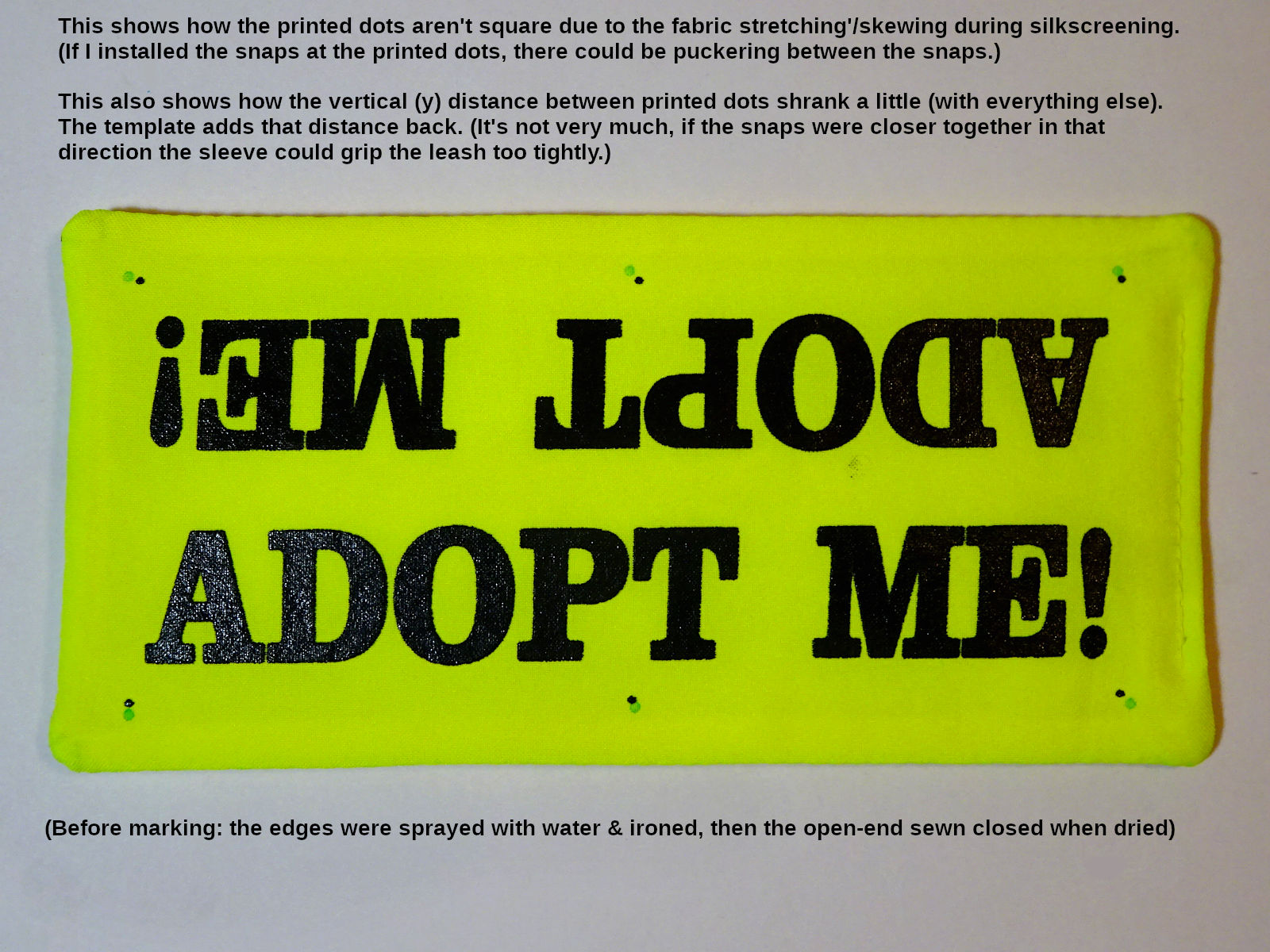
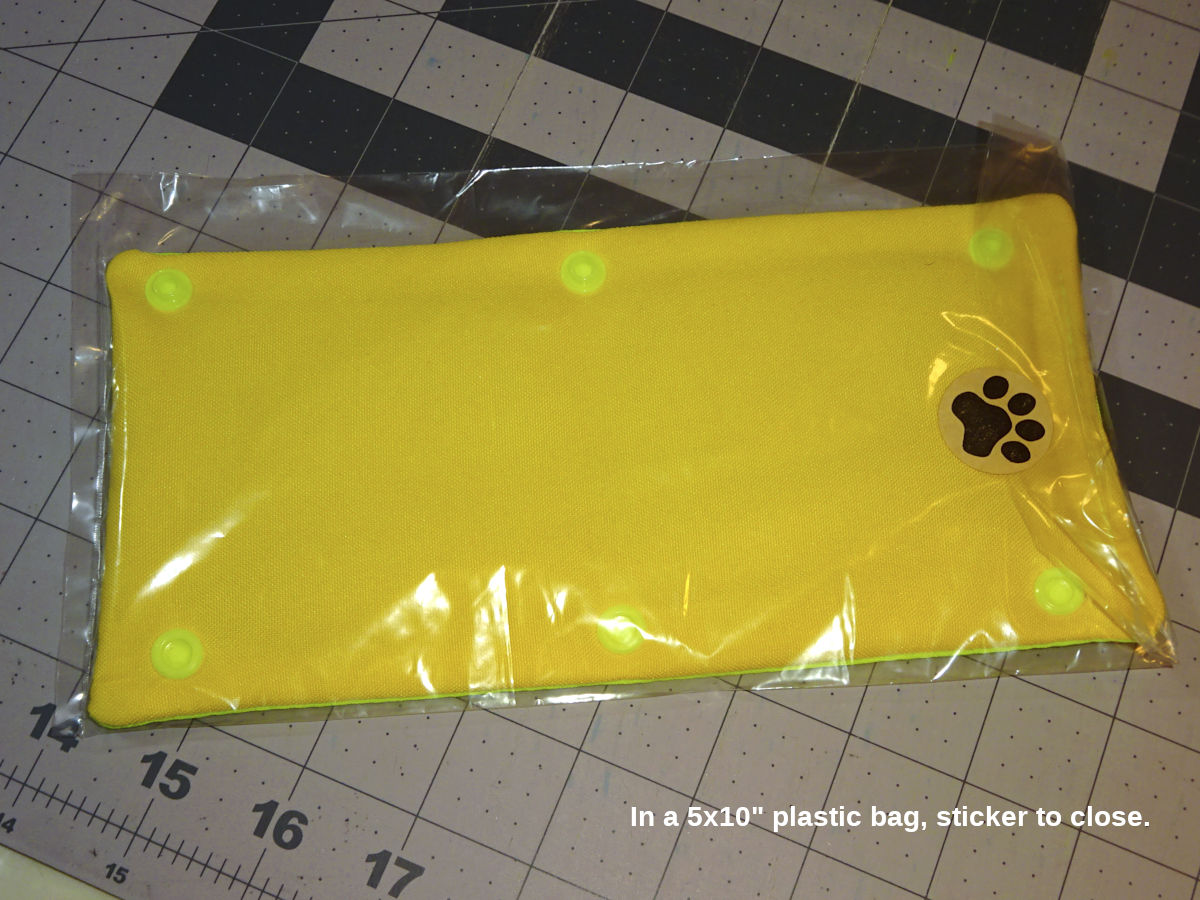
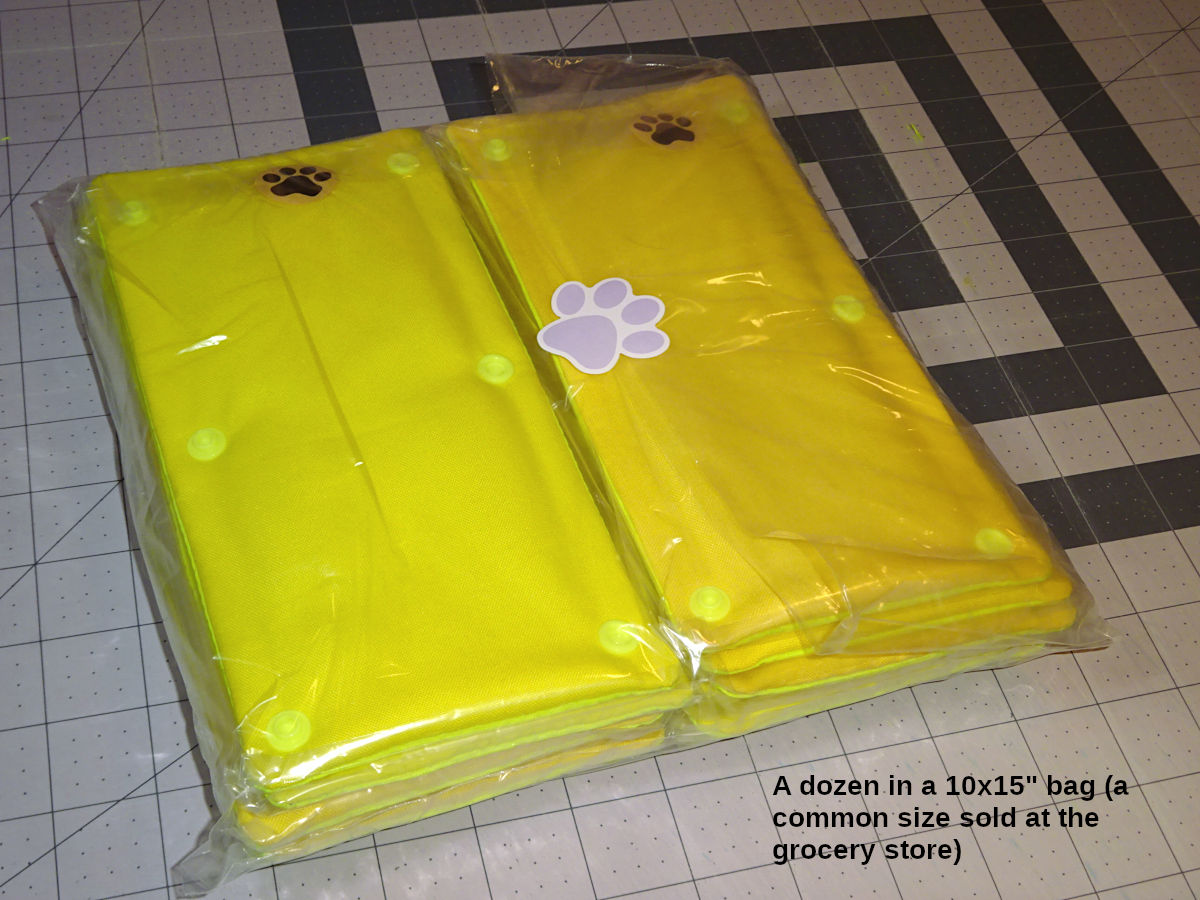
I was inspired to make and donate "Adopt Me" leash sleeves after seeing one made by Patience & Love.[1] This page explains how I make them. I targeted these dimensions based upon the P&L sleeve: However, I ended up shrinking those dimensions about 4% (except the distance between snap holes in the y - vertical - direction which would change how the sleeve grips the leash). This photo shows the P&L sleeve (top, embroidered) and one I made (bottom, silkscreened): Note: if I did this again, I would try expanding the space between the text tops (move the text down 1/32" each side for a total 1/16" increase between text tops). Sometimes I feel like that vertical position of the text could be a little better balanced in the background. There's space for it to move a little toward the snaps. (Note: the font's "!" character descends a little below the baseline of the rest of the text. If you move the text down, pay attention to how close that character is to the snap.) This zip file contains the following artwork drawn to the quick-ref dimensions (not my shrunk dimensions which was done when printing the mask to create the silkscreen): That artwork was created using the free Inkscape program. The 6-sleeve drawing is what I printed. It contains some "INFO" layers documenting the measurements, my thoughts. The other drawings don't have that. (Note: The "INFO" layers won't make sense unless you keep in mind that the sleeves use 1/2" fabric outside the left & right edges of the artwork. This artwork was made for a screenprinting press with a print area of 18x15" printed on a 20x16" piece of fabric required by the press.). When my silkscreen was created, I had the artwork scaled down 4%.[2] But, shrinking the 6-sleeve artwork isn't optimal because it contracted into the center. I should've shrunk the 1-sleeve & created a 6-sleeve using that. The shrinkage would've been spread around the whole fabric. The way I did it, it gets a little tight between the sleeves. Clarification: I said above that I didn't shrink the snap holes in the y - vertical direction. Actually, they did shrink with everything else. I compensate by installing the snaps 1/32" below the printed dots. (I use a template to mark the holes. That template has the correction.). I created the 6-sleeve artwork because I found a commercial (wholesale-only) contract printer willing to do this for me [I can't say who; they don't want to work with the public]. Their print area is 18x15 (for t-shirts). They required a minimum 19x16 fabric. I designed the 6-sleeve artwork for that. Cutting 60"-wide fabric (16" long) gave me three 20x16" pieces. That gives 2" excess fabric in the x - horizontal direction (and 1" excess in the y - vertical direction required by the printer). I drew the artwork to use 1" of the 2" excess in the x direction for the sleeve. (I.e., 1/2" outside the 18" print area - each side - is used for the sleeve.). This means there was 1" waste in both x & y directions. This was necessary for their silkscreen machine's frame to clamp onto. If you silkscreen yourself, you wouldn't need any excess.). It turned out well. It was cheap! ($0.76 per piece of fabric. Each piece has 6 sleeves. That's $0.13 per sleeve @ 2023 prices.). If I did this again, I would silkscreen myself. You can find videos showing how. It doesn't seem complicated. Start with one at a time, then 2-up, then 3-up. I think 2-3 would be easy to work with; less potential for stretching the fabric, skewing the print the way 6 does. Printing a few at a time gives you a chance to modify the artwork's dimensions. (The way I did it was "big bang" - printing thousands all at once. That was scary.). You can find local retail silkscreen printers who do low-volume promo jobs for local clubs & businesses. They can adapt the artwork for you. You'll pay more than I did, but have more of a relationship, flexibility to do small runs (make changes along the way). If you watch videos about silkscreening intending to do it yourself (if you educate yourself, show you're serious) they might let you watch what they do (in support of your cause). Finding a wholesale silkscreener as I did would be useful for group-buys where one person makes it happen, parcels out the result to the group. You should able to see 1-2 small runs from a wholesaler so you can see how it will come out before committing to a large job. They don't want a lot of little jobs as you figure out the artwork. It would be better to work things out first using DIY silkscreening (or a retail silkscreener). I don't have a single way to make sleeves. I like how they come out 2-3 ways. I'm still experimenting. It takes time to get a sense for how these materials work together. Also, there can be variations in materials (heavier fabric, loftier/heavier batting). As you develop a sense for how the different materials contribute to the finished sleeve (a balance of soft & rigid; weight but not excessive; light but not springy), you can make slight changes as you encounter variations. The following describes what I've learned, the different ways I make mine. The order of materials (finished sleeve) may help to understand the following. I use 100% polyester poplin. The front is neon yellow (aka "hi-vis yellow," "safety-fabric yellow"). Some people call it green (but there is a hi-vis/safety fabric that's more green, called neon green. That could look good too.). This color is hard to find because sellers often call anything yellow "neon yellow" (when its not even close to this. Or, I saw it called neon green when it was neon yellow.). Online photos rarely look like what the fabric will in person. I buy a sample. If it's right, I buy everything they have. I bought 200yds that way. No regrets. (Whereas, I bought 5-10 yards of other fabric I was optimistic about, and ended up wishing I only bought one.). Almost everything I found that was the right color was close-out (the seller couldn't get more). So, there's an incentive to buy it when you find it. But, be careful to see it first. Most of the time what's called neon yellow isn't. You can use the disappointing samples for the back fabric, or interfacing. For the rear fabric, you can use any color. (Since neon yellow's hard to find, it's easier to use a different color). My favorite color for the rear is in the range of mango, amber, saffron & creamy Orangesicle color. I think that goes well with the neon-yellow front. Something more orange than gold color. But, not too orange (like Home Depot orange). This color is more available than neon-yellow, but still hard to find online because people call it yellow, gold, orange (when those names cover a lot of colors that aren't this). It doesn't matter since it's the back. But, when I find something that's right, I buy as much as they have (or confirm they can get more). The poplin I use (front & back) is pretty lightweight. The following discussion about materials is relative to that. If you use heavier fabric (I've found some that's almost like denim, or the outer shell of a work jacket), that could be better, longer-lasting. But, you'd have to dial in the following materials for that (lighter stabilizer, no interfacing, then dial in the batting loft/weight). I try to keep some heavier back fabric for use when the batting varies lighter. (Heavier back fabric can compensate for lighter batting.). Polyester shouldn't shrink. But, I soak my cut pieces in hot water for a few minutes, then hang on a rack to dry. You should do this with the front pieces before printing, and the back pieces before sewing. (Note: machine washing and/or drying will cause a lot of fraying. Gently soak & hang.). These three materials work together to provide rigidity (so it holds its shape), and weight or body (plumpness; grips the leash better). I've used high-loft (heavy weight) batting by itself. When compressed around the leash, it gave some rigidity like stabilizer or interfacing. Medium-loft with interfacing gives some rigidity without being as "poofy" (overstuffed). I've used stabilizer & low-loft batting (and no-loft fleece batting) for firm body & almost no poofy'ness. It's surprising how small changes can be felt in the finished sleeve. The best combination depends on your front & back fabric's weight. It takes some experimenting to find it. It's useful to make prototype with similar fabric (don't waste the actual fabric you'll make real sleeves with. Find some other color about the same weight. Experiement with that.). Write notes on each one about the materials used. You'll learn a lot revisiting them, feeling how the combination turned out. You can compare one to another, and feel what changed. The following describes what I've experimented with, how each material plays with the others. I use Pellon 926 extra firm stabilizer (9-1/2" x 5) for any of the sleeves I make. The least expensive source I've found are 20"-wide by 10-yd bolts on Walmart's website (online-only purchase). I also use Pellon 50 heavyweight (thinner than 926). I use this as a strip along the long edges of the 926. With only 926, the edge between the snaps isn't as rigid as I'd like. It can spread open a little too easily. Adding a strip of 50 gave that edge a bit more stiffness. I use stripse 1" to 1-1/2" wide. What works best depends on the batting, the fabric's weight, whether I use interfacing. There's also Pellon 40 midweight. It's thinner. If the fabric is heavier like denim, then I use Pellon 50 as the full-sleeve stabilizer (instead of 926), and even Pellon 40 for the edge strips. Stabilizer is said to be made for support while sewing. From what I've read, it's usually cut out after sewing. (Ex., a hat/cap with embroidered design will usually have stabilizer inside.). But, Pellon's product guide gives examples of permanent use (like drape headers, hat brims). I haven't looked at interfacing very much. There's a lot of variety to choose from. Now that Joann is out of business, it's hard to expose myself to it all. The only interfacing I've used is Pellon 988 fleece interfacing. I got it because Fairfield's Project Fleece and Warm Company's Soft & Bright (both considered batting) were a little too heavy for what I was trying to accomplish. 988 is very similar; but a little lighter, less thick. Still, it was too much for the materials I use. (I almost never use it.). However, I like using a layer of polyester poplin fabric (lightweight, same as the front/rear fabric) when the batting varies lighter. I call that "interfacing." Some batting doesn't need it, some does. Plus, the batting that doesn't need it can vary in weight & loft. When I notice that, I compensate with this fabric interfacing. When I use interfacing, I use 9" long (like the other materials), but only 3" to 3-1/2" wide (so it covers the center of the sleeve to the snaps, more or less). 3-1/4" extends to almost the snap holes. The snap cap will crimp down onto the edge of the interfacing. If you use a full 5"-wide interfacing (sewing through the long sides), it will turn into two layers when turned inside out. That's too much bulk along the edge. Thats why I center a narrower interfacing when I want to add some weight. Adding bulk to the short edges of the sleeve (sewing through the interfacing, folding into two layers when turned inside out) is ok. That grips the leash better. The long edges are better without that heaviness. (If I was ok with the thick edge, I would consider 2 layers of 50 stablizer instead of folded full-size interfacing. I think that would give more skeletal strength/body. I always stack the interfacing on top of the stabilizer, below the batting (see order of materials - for sewing). I use white fabric for stabilizer. But, you can use your back-fabric rejects (wrong color). It won't show through the front nor back. (After turning inside-out: the white stabilizer will be between the fabric interfacing and front fabric. (The batting will be between the fabric interfacing and rear fabric.). I don't understand the difference between interfacing and stabilizer. The internet says interfacing is intended to remain in the sewn product (like shirt collars; sleeve cuffs). Stabilizer is to give support while sewing, then cut out. (But, as mentioned above for stabilizer, Pellon's product guide gives examples of stabilizer used like interfacing.). You should always use 100% polyester batting. Think of batting in terms of weight & loft. There is heavy low-loft (even no-loft) batting (Warm Company Soft & Bright). There is very light batting with a relatively high loft for its weight (Fairfield Low-Loft). If a batting has higher loft, its compression around the leash can add some rigidity (like stabilizer & interfacing). A heavy no-loft batting can have rigidity, but not grip the leash as well (may slide down). Using stabilizer can add rigidity to a light batting. Using fabric interfacing can add some loft & rigidity. You have to experiment find a good mix of compression, grip, and rigidity. As I've experimented, it stands out to me that I'm trying to make a nice glove. A mix of softness, plumpness, firmness. I primarly use Fairfield "Poly-Fil Featherweight thermal bonded" (FW). 48" x 60yd roll (SKU: RSF-48-60YR-1. 2.25oz/sq yd. 3oz/linear yd). This is almost exactly the same as LL (below). Since you buy this in bulk, it costs half as much per-sleeve. Being thermal bonded, it's a little more consistent & stable (resists clumping, bearding). The thermal bonding gives one side a slightly crusty feel. I face that side against the 926 stabilizer. The other side seems softer, plusher. I want that facing the rear fabric so it might conform/grip the leash better. This batting is currently my favorite. I use these materials with it: Batting isn't made 100% consistent. It can vary in loft & weight. You'll notice it as you work with a batting for awhile. When I encounter lighter pieces of this batting, I might increase the width of the fabric interfacing to 3-3/8" or 3-1/2" (just a little more can make it feel heavier, plumper). I might use a heavier back fabric. I've accumulated different back fabric and some are lighter, heavier. I choose from those. This batting may be slightly less lofty than LL, but a bit more firm/rigid (13% more weight). Being bonded, it may be better quality than LL, but it only comes in a 60yd roll. If you're getting started, I would use LL which is more easily available. It's almost the same. A little more poof in the finished sleeve. A little more plush feeling (not as firm; the loft compresses easier). The finished sleeve comes out about the same using the above materials. See Fairfield's product page for more info. I've seen this on Amazon (ASIN B00YNZ7V78). Also QuiltBatting.com, but they're pretty expensive. Two other battings are also favorites. I still make sleeves using these, and still debate if they turn out better than the above: "Fairfield Poly-Fil Low-Loft" (LL). This batting is inexpensive at Walmart. (It comes in different sizes. Calculate the cost per square-inch to see which is cheaper.). I've seen it in two packaging designs: Fairfield says the weight is 2oz/sq yd. The loft is between 1/4 to 3/8", but it's very light/silky/wispy. It compresses very easily. There can be a lot of variation between batches (even in one sheet). This is almost the same batting as FW above. It's not bonded (doesn't hold together as well, called "bearding." I don't think that's much concern inside the sleeve. But, you have to work with it as a sheet more carefully.). It's a little loftier. But, it's a little lighter too (the loft compresses easier). It comes out about the same. Sometimes I feel I like this better than FW. I would make the sleeve the same way as I do with FW, but maybe use 3-1/2" wide fabric interfacing. If this batting varies too much more toward thin/light, 988 interfacing might work better. Adding 1/8" to the Pellon 50 edge-strips might work better (more rigidity). Heavier back fabric might be better. Fairfield "Poly-Fil Lightweight Thermal Bonded" (LW). 48" x 45yd (SKU: RSL-48-45YR-1. 3oz/sq yd. 4oz/linear yd). This is 33% heavier than FW; and 50% heavier than LL. I like this batting a lot. The loft isn't as high, but it's heavier weight. That gives some rigidity FW doesn't have. And it's not too poofy (lofty). The finished sleeve has more springiness in the loft. It's firmer, more rigid; wants to return to its shape. Sometimes I like this better than FW. This batting comes out well made the same as FW above, but with 1" to 1-1/8" 50 strips. No fabric interfacing. This batting can vary thinner, lighter. When it does, I might use fabric interfacing, or 1/8" wider 50 strips, or heavier back fabric. Joann used to sell this by the yard (it was called "JR4" on their website). Joann also sold a bagged product (40" x 10yd) called "Soft & Crafty" on their website (but the bag said "Basic Batting"). It was virtually the same as this & J4. (The roll of LW I received has lower loft than those, but produces almost the same result because it's the same weight.). Like FW, I face the crusty (thermal bonded) side against the 926 stabilizer. See Fairfield's product page for more info. (Be aware: the scale photo with the dime is incorrect. It's not nearly that thick.). I've seen it on Amazon (ASIN B002PIOMAE). Quiltbatting.com too (same link as above) There's also Fairfield Project Fleece batting which is very easy to find, sold at Walmart. It's a little more soft/fluffy (loftier) than 988 interfacing. Warm Company Soft & Bright batting is no-loft like 988, but a little heavier, adds more substance than 988. I used these before I discovered stabilizer. They gave some rigidity without loft. But, it was never right. I haven't used either in a long time. I've used a heavy'ish 3/4" high-loft batting with nothing else. I liked it when it was snapped onto the leash. It was highly compressed and tight. But, without stabilizer it was scrunchy, didn't stay extended. I never tried it with stabilizer. Pellon 40 might help. Pellon FF76 (Flex-Foam; naked foam) is interesting. It's not batting. Pellon calls it a craft, home-decor material. It's often sold as stabilizer. Occasionally I make a sleeve with this, and feel like it might be good. Notes: I like the overall feel of this. It has a strong affinity to hold it's shape, spring back into shape. It has a little loft like batting (to conform to & grip the leash). The batting-based sleeves I make feel more like a glove, apparel. This FF sleeve feels more crafty & purpose-built (for the job of displaying the printed message). It feels more like a tool; heavy duty, resilient. It costs less to make a sleeve (FF costs less than batting. It uses a lighter, less expensive stabilizer. No interfacing.). I keep returning to this thinking it might be better. The struggle is that the foam shouldn't reach the stitches, and the edge needs enough bulk to be stiff. There needs to be a transitioning from the foam (cut to a width that doesn't reach to the long edges of the sleeve) to something more rigid along the edge. Perhaps two layers of strips (926 + 926, or 926 + 50), one of them 1-1/2" wide (feather the stabilizer edge into the foam's edge?) Note: Don't confuse FF76 with FF77 which has a layer of "tricot" (fabric) on each side. It's a little thicker (5.5mm), and too much for a leash sleeve. FF76 is "naked" foam, and 5.1mm thick. I think there's also "fusible" variations of FF. I don't use that. There may be thinner foam which might work better (maybe allow the use of LL or FW batting). When you search for "sew-in foam" you find other products (which might not even be foam, like Annie's Soft & Stable fabric. There's also a "puffy" foam used for embroidery (to make raised 3-D embroidery). I'd like to experiment with more of those. Summary: expect to mix & match materials to see how it comes out. Make samples (using any front/back fabric that's similar weight to what you'll use). Spend time feeling the difference. Jumble them up, close your eyes, and guess what's what. Over time you'll have a intuitive sense for how changes in materials feel. I use Gutterman Mara-70 poly (tex-40) neon yellow #3835. You can find this on Wawak, or RipstopByTheRoll. This is the only tex-40 I've found in neon yellow. (They have neon green too, #3836). You can find lots of neon yellow in tex-70 on Amazon. But, to me that's too heavy for this. It could work depending on the heaviness of your fabric. My fabric is thinner, prone to puckering. I think heavier thread would make that worse. But, I haven't tried it. You'll probably need a walking-foot sewing machine to sew 5-6 layers (2 stabilizer, 1 optional interfacing, 1 batting, 2 fabric). Many home machines come with a "walking-foot" attachment. These aren't exactly like a real walking foot (the top foot isn't independently powered. It simply pinches the fabric down against the machine's feed dogs, and moves with them - keeping the material pinned together.). There's also aftermarket walking-foot accessories. I used one with a vintage Singer 201-2. It was definitely better than not using it. But, not as good as a real walking-foot machine. If your machine doesn't come with one made specifically for it, you can use an aftermarket. But, you have to look further than whethr it says "fits" or "works with" your machine. I've gotten the impression some are more "universal" than others. That means the foot may not align well with the machine's feed dogs. The accessory may install, and the feet move with the fabric. But, it may not work as well as one whose feet match the feed dogs better. I encountered this when buying one[3] for my Singer 201. Pinning the material together works better than clips (more solid, less puckering. This should work without a walking foot.). I've moved on to a real walking-foot machine (below). But, I think I've learned to sew better. If I still used the Singer 201 (with the walking-foot accessory), clips might work better now. Also, some clips have a weaker spring; some are stronger. I think I was affected by that too. Using clips, it helps if you clip the material so it's taught across the top (like a drum). I.e., after clipping the material, it will be poofy, loose, slack. Flatten the material with the palm of your hand, and open/close each clip taking the slack out of the material. Additionally (using clips), there's a technique while sewing which can help reduce puckering: lay the palm of your left hand flat on top of the material (your fingers pointing to the rear of the machine; your thumb pointing to the right. You want your index finger and palm as close as possible to the sew line while allowing the foot to travel past. (Your thumb will contribute to holding the material taught - just a little. Don't stretch it.). You want to flatten & tighten the fabric, but not interfere with its movement. You don't want to "help" it move. This takes some practice. There's a sweet spot where you're flattening the fabric near the line to sew, steering the fabric so it sews on the line - but not creating drag nor pushing it. Lower-loft batting is less problematic. Higher-loft is prone to more puckering. It's more important to use the flat-hand technique to flatten those as you sew. Pins are the ultimate solution, but they're slower to install. You have to remove them as you sew. Today, I use a Juki DU-1181N which is a real walking-foot machine, and made for lighter thread & materials (most industrial walking foots which are made for upholstery, leather). It works very well for this. It's almost too much machine for tex 40 thread & the light fabric I use. You'll have to fiddle with its adjustments[4] to get it dialed in for no puckering (then it's great). This machine uses an oil pan & pump, and is designed to operate at high-speeds. There's a sight bowl on top where you should see oil splash (but won't until a certain speed). I sew at the motor's slowest speed. I never see splashing. Because of this, I wait to wind the bobbin until it runs out (normally I would wind while sewing.). I wind the bobbin with the motor's speed-knob turned up to 1600-1800 so I can see some splashing and know oil has circulated. (Don't go over 2000 because that's the machine's max sewing speed.). Sewing at the lowest speed doesn't need much lubrication. The pump may be spreading oil at a low speed (I just don't see it flinging onto the sight bowl?). But, it seems wise to operate the machine at high speed occasionally to see the oil flow. Winding the bobbin is a good interval.). There are some external locations behind the machine that require manual oiling (see pg 8a of the instruction manual. Note: that manual is modified to be english only. If you prefer another language, see the official manual. It has seven languages side-by-side through the entire manual. It's hard to read.). This machine uses Juki #1 oil which is lighter than #2 used by the LK-1900 I make collars & leashes with. (The external oiling points might be ok with ordinary zoom-spout oil or #2. But, the pan should have #1.). I re-oil those external points before winding a bobbin. I also put a drop on the hook (the groove it rotates in). I believe the hook receives oil from the pump. But, I give it a drop by sitting on the floor to access it (without tilting the machine back exposing the oil pan to contaminants.). There is a felt pad underneath a rubber plug on the top of the machine. If you don't use the machine for awhile, the manual says it's good to apply some oil to that pad. (That should probably be #1 oil since it will mingle with the oil in the pan.). I awlays put a drop of oil on the hook too, and the rear oil points. Note: You shouldn't tilt the machine open too often. Dirt can get into the oil pan. When you do, do it carefully, look for junk trapped in the crack between the table and base of the machine. Use q-tips to carefully clean that ledge without knocking anything into the pan. When the machine's not in use, cover it with a plastic bag that's large enough to cover the crack around the machine's base (prevent dust from collecting in that crack). I cut a large 35-gallon yard/leaf trash bag to be 18-20" tall. That makes a good cover which goes past the crack around the machine. (If you don't use the machine for awhile, wipe the table for dust, but don't wipe it into the crack.) There is also a brochure, parts list and engineer's manual for this machine. I draw the horizontal sew lines 13/16" from the bottom edge of the text. (Note: this font's "O" & "!" descend a little compared to the other letters. I align to the other letters.). I draw the vertical lines 5/8" from the printed dots. For the end that's sewn closed: I tend to draw the line 1/16 to 1/8" less. (This end can be short due to the way I shrunk the 6-sleeve artwork. The two rows of three sleeves shrunk closer together.). For the end left open (the sleeve turns inside-out): I mark 1/16" further from the dots. But, it's important that there's a generous amount of excess fabric to fold inside & sew closed. If the excess is short, it's hard to fold & sew. Ex., sometimes my gang of 6 sleeves weren't printed as centered as I hoped. In that case, 5/8 + 1/16" (11/16") doesn't leave enough excess. I might mark the line at 5/8" (or even 1/2" if I have to). OTOH: If the excess is large, I never draw the line further than 11/16". I think drawing the line at 3/4" looks imbalanced (compared to the other end). If I didn't print the dots (they're not as useful as I thought they'd be. I talk about that more in the section Marking the snap locations using a template below), I would draw the lines from the vertical edge of the letters M & E (top line of text), and D (bottom). It's not hard align (square) the ruler from those vertical edges of the text the same way I do to the dots. FYI: you can't align to the ends of the text ("E" and "!") because the exclamation point is set to a smaller font size. It doesn't align with the "A" above it. The printed fabric is sewn upside-down, so you need to draw the lines on the back of the fabric. Poplin is lightweight, I can easily see the printed text from the back. If you use heavier fabric, you may have to draw the lines with a light shining from underneath. I use a water-erasable pen. I've learned to pay attention to how heavy (strong) the line is because they'll bleed when ironing the edges (water is sprayed on the edges). It's not a big problem. It easily wipes off with a damp cloth (I do this when I bag the sleeves). But, when a pen's new, I try to press lightly. When it's older, I drag the pen twice to get a stronger line. There are air-erasable pens (disappearing ink). That could be better. I like to mark a couple dozen sleeves at once, and take a couple days to sew them all. Air-erasable may not last that long. Unless otherwise noted, everything is cut 9-1/2 x 5". I stack the material in the following order for sewing (listed from top to bottom): Note: When you turn the sleeve inside-out, the rear fabric's top side will be the exposed side. Fabric has a "finished" side which usually looks nicer (the unfinished side can look coarser). I like the coarser side to be exposed on the back of the sleeve. It looks more like "the back." Plus, the coarser surface might grip the leash better. My reasoning for that order: 1) I always want the batting (loft) to be against the back fabric (after it's turned inside-out). I feel like that will conform around the leash and grip better. 2) If using a bonded batting, I want the softer (not crusty) side facing the back fabric (for the same reason). 3) I never want anything between the stabilizer and the front fabric. There's no reason to. 4) Therefore, if I use interfacing (fabric or 988), I put that between the stabilizer and the batting. The first step is to lay the Pellon 50 stabilizer strips along the edge of the Pellon 926 stabilizer: I use strips that are 1" to 1-1/2" wide depending on what works best for the materials being used. (I might use Pellon 926 or 40 strips depending on the materials being used. Likewise, 50 or 40 for the underlying stabilizer sheet.). Currently, I use 926 with 50 strips. The strips are in the range of 1-1/8" to 1-3/8" wide. They add skeletal strength when the sleeve is snapped together. More or less works better depending on the batting and interfacing (if any), the front/back fabric weight. If I use interfacing for more body/weight, I lay that on top of the stabilizer. I never use full-width (5") interfacing. It gets sewn through and folds over creating two layers. It doesn't feel right along the long edges (it's ok along the short edges. If they're fatter, they'll grip the leash better). I use 3" to 3-3/4" wide (fits within the stitches without being sewn through). Usually 3-1/4 (almost reaches the snap holes) to 3-1/2 (covers the snap holes). Depends on how much weight I think would help for the materials used. (This is usually when the batting varies thinner). Next, I lay the batting (crusty side facing down if bonded). Then the rear fabric (coarser or "unfinished" side up). Finally, the front fabric on top (printed side down). I position the materials so there is an even amount of excess of each all the way around. Next, I clip the center of the long-edge facing me; rotate the material 180 degrees & check the positioning from that side (clip that center). I proceed to re-apply the first four clips. Check the positioning again. Then palm-flatten the material & re-apply the long-edge clips to take the slack out of the material - make it "taught" as described in the sewing machine section above. Finally, I apply the short-edge clips.): The red "X" shows where to start sewing, and where to end. If you have trouble with the fabric shifting, puckering, then you may need to use pins to hold it together more securely: That goes slower. You can sew over the pins, but they'll bend & become hard to reuse (I used the thinnest pins I could find, for lace or appliqué? Thicker needles might not bend, but they might leave holes in the face of the sleeve?). Your machine's needle may break if it hits a pin. It goes slow removing pins compared to removing clips. But, this should work no matter what kind of sewing machine you have. You need a walking foot for this, even if it's just the "attachment" type. How well that works (doesn't shift, pucker) has a lot to do with the presser-foot pressure, the thread tension, the stitch length. Your technique (holding the fabric down flat with your palm and extended fingers) as it sews. I suggest that you buy some random/cheap poplin fabric & experiment sewing these materials (layers) for practice, play with the adjustments I mentioned until you get it working well. No reason wasting actual sleeve fabric figuring this out. You might have to pay an experienced sewer to show you how to do it. This kind of sewing (layers) is similar to quilting. They struggle with the same thing. Seek them out. See the sewing machine section above. This shows the sewn sleeve: My stitch length is 6-1/3 stitches per inch. I start sewing a little lower than the printed dot (A), going in reverse up to the text (B, to lock the stitch). Then forward all the way around (clockwise). I end the same way I started: going to the text (C), then reverse a little past the dot (D, to lock the stitch). It's important to drop the needle exactly in the corners, or a little past. If you stop short, you'll get rounded corners when you turn the sleeve inside out. Sometimes it's best to go one more stitch past the corner. I rotate the material 45-degrees so the corner stitch lands behind the drawn corner. (Then I rotate another 45 so the next stitch lands on the sew line in the new direction.). Sometimes I push the reverse lever a little before the needle sinks into the fabric. This reduces the stitch length to land closer to the drawn corner (if it's going to overshoot the corner too much). Or, if I'm short just a tiny distance: I back the needle out, lift the foot & nudge the material a little so the needle comes down where I want it. (You should only use that method for a very short distance. If you go too far, you could create a gap between two stitches that the corner-pointing tool could poke through.). After sewing, I trim the two long edges to leave excess 1/4" + 1/32" to 1/16" past the stitches. I trim the short edge (sewn closed) to be 1/4" (a little more if there's enough material. Sometimes this end is a little short due to the way I shrank the 6-sleeve artwork. If there's enough material for 5/16", I leave that much. I try to have at least 1/4"). I trim the other short edge (left open) to 3/8" + 1/16" (7/16"). Being a little longer helps with folding it inside & sewing closed. 1/4" works if that's all there is. But, if you have more, it's easier to fold and sew closed: Cut the corners off to make it easier to "point" the corners. Thus cut should be 1/16 to 1/8" from the stitch. Be careful to judge the distance from the stitch, not the drawn corner (this is important if you sew past the corner. You might cut through the thread, or so close that the fabric is prone to unraveling. It's handy to keep some clear nail polish. If you go too close, you can apply some polish to protect it from fraying.). Once turned inside-out & the snaps installed, the corner stitch won't get much stress. You just have to be careful while pointing the corners not to push too hard on any that were cut too close. Note: On the end left open (has more excess fabric), it's easy to get the angle wrong. It's best to get the same 45-degree cut like the two other corners. Pay attention to the drawn corner, not the fabric's corner (which can be misleading - an "optical illusion" - because it's longer along the open edge). After trimming the edges & cutting the corners off, turn the sleeve inside out like a sock. Use a corner "pointing" tool to push the corners out. I use a Dritz 636 Point Turner (ASIN: B00CI571LQ). Warning: the tip is sharp. It can poke through the fabric or between the stitches. (I lightly rubbed the point against a file to make it a little less sharp.). I clip the open-end with 3 clips: It seems that leaving it clipped awhile can help it stay folded when ironing. I don't know how long. But, going straight to the iron doesn't work as well. 30 minutes might be enough. I'm in the habit of giving it a few hours. When you turn the sleeve inside out, the order of materials will be: Finally, I iron the two long edges & the one short edge clipped closed (waiting to be sewn). I don't iron the other short edge. It will grip the leash better if its fatter. I lay the sleeve on the ironing board with the back-side facing up. I spray water along the edge to iron, and then iron. I iron only 1/2" into the sleeve (you don't want to iron the whole sleeve. That would flatten the batting.). You have to play with the heat. It seems like the batting can melt inside the sleeve (the bonded FW and LW bonded battings can do this at a lower temperature than LL.). A little melt may be good, contributing to a flat surface around the edge, compacted, rigid. If it melts too much, you'll feel a hard ridge where the edge of the iron was. (If the heat's lower than necessary, the edge may not be sharp, compressed.). When starting: lay a piece of fabric over a piece of batting, and find what temperature causes melting. (Iron it, examine it; turn up the heat; do it again until it melts. The remaining photos show the ironed sleeve. It has a sharper edge. You can especially see it in the photos of bagged the sleeves. I use Kam Snaps (B36 - Neon Yellow; size 20, which is 12.5mm diam; regular 5.6mm stem length). They make a hand & professional table press. I've only used the table press (DK93) to install snaps.[5] It's worth the money to buy two presses so you don't have to change the dies. (They make a no-change die which works with both male & female snaps. I haven't used it. The pros and cons sound like dedicated dies work better.). They make a snap-removal die for use with the hand press (KX8J). I highly recommend buying that because you'll occasionally do something wrong, crack a snap and need to remove it. It's much easier to do with the tool. It's convenient to have two (dedicated to gender. It's a little frustrating to have to flip the die for gender. But, you shouldn't have to remove snaps very often.). Quality control: The snaps can crack during install. Sometimes I hear a crunch when pressing down. I examine the snap with a magnifying glass and usually see a crack (remove and install a new one). You should snap them together at least once as a matter of quality control. I've seen the barrel part of the male pull off (something during the install weakened it, or it was a manufacturing defect). You won't know unless you're in the habit of snapping/unsnapping once. Kam-Snap kits include an awl to poke a hole through the fabric. WARNING: That awl is very sharp and painful when you jab yourself. I haven't jabbed myself for a long time. But, when I started, I did it a few times. It's very painful. Be prepared. You may have to endure it a few times. (You could make leather covers to go over the two vulnerable fingers. But, like a hot stove: you learn quick. I do it without thinking now, and haven't stabbed myself for a long time.). The snaps should be positioned squarely to each other (and centered within the sleeve). If the snaps aren't square to each other the space between snaps will pucker. (If the snaps aren't centered on the sleeve, one long edge will hang past the other when snapped together. Or, it could be lopsided at each corner.). I added dots to the silkscreen thinking this would be simple & and timesaving. Unfortunately, the fabric can shift when silkscreening & sewing. (I screened multiple sleeves onto a large piece of fabric. Printing just 1 or 2 with a small screen might work better.). Instead of using the printed dots, I created a plastic template to mark the snap locations on the finished sleeve. I position the template on the sleeve so it's straight with the sleeve's long edges (and centered between them. If not, one side will hang lower than the other when snapped together): In the x (horizontal) direction: I try to position the template so the template holes are equally close to the printed dots (left/right only). I.e., if the printing is skewed - the dots are a little off from the marking holes: I try to position the template so no one hole & dot is more off than any another. Again, this is only for left/right positioning. For vertical (y) positioning: the only thing I care about is that the snap holes are equally distant from the long edges of the sleeve. I only look at the long edges of the template for that, trying to center them between the sleeve's long edges. I don't look at the printed dots.). The marked sleeve looks like this: You can see the significance of getting the snaps square to each other. If I installed the snaps at the printed dots they wouldn't be square, causing puckering when snapped together. (The above also shows how the template increases the distance between the snaps in the y vertical direction. Remember I said I had the artwork shrunk 4%, but I didn't want this distance between snaps to shrink - which would change how the sleeve grips around the leash. I corrected for that in the template. You can see the marked holes are a little more distant than the printed dots.). To mark the hole positions: use one hand to press the template down firmly so it won't move (spreading my fingers to distribute the pressure over more area.). I push a LEONIS Water Erasable pen (ASIN: B00IWEAPSS) into each hole, rotate it for a good mark. (The template's holes are drilled to a size that's snug to this pen.). It's important that the template not move as you do this. Applying some painters tape to the underside of the template can give it some friction against the fabric. There's also puffy & soft first-aid tape, "mokeskin." (You shouldn't move your hand until all the holes are marked. If the drilled holes are too snug, the template may lift with the pen, causing movement.). Note: I still like using the printed dots for side-to-side positioning. I feel like that takes some guesswork out of it. (Plus, I use the corner dots for marking the sew lines on the short ends of the sleeve.). But, the snap caps are a little translucent. You can vaguely see something's underneath. If I printed mine again, I'd try making the dot smaller. Or, not print them at all (the short-edge sew lines could be measured from the upside-down D's vertical edge and the vertical "M" & "E" edges below it.). I created a seperate page explaining how to make the template. That topic is pretty tedious. It's worth spending time getting it right. The sleeve won't look right snapped together if you don't get this right. Idea: I'm thinking about making a "jig" that I could fold the sleeve in, flatten the long edge, then pierce the snap holes through both sides of the sleeve at once. I think that could be ideal. Initially, I found 5x10" 1.0mil flat poly bags at a good price. I closed the bag with 1" stickers found on Amazon (paw print): I package a dozen of those into a larger bag, sealing it with a 1-1/2" sticker: That larger bag is 10" wide x 14" deep. It appears to be a common size (found at Kroger & Walmart: 75 bags in a box. I've seen a 500-bag roll online. I've seen them called "twist-tie bags" or "bread bags."). Those photos show paper stickers. Now I use clear vinyl stickers (with a black paw print. The 1" vinyl I use is ASIN B0D9NR1ZWH. The 1-1/2" is B0C9W9CZ2Z). Paper stickers tear open. Vinyl stickers can re-seal the bag a time or two. Note: those photos show the ironing around 3 edges of the sleeve. Those edges are visibly flattened. Now I'm using zip-lock resealable 2.0mil 5x10" bags. They cost twice as much, but you save money not buying stickers. This bag can be used to protect (store) the sleeve between uses. The dimensions refer to the inside of the bag. There's a bit too much excess. A 5x9 might be better size (but it's not sold as a standard size. I assume it could be ordered custom.). The zip-lock bag is air-tight. If you stuck the bagged sleeve in your pocket, the air would be trapped in the sleeve, making it bulky in your pocket. I punch a couple ventilation holes in them. The holes let it compress like the sticker-closed bags. (If the sleeve were wet after use, it could dry over time.). You can custom order them with holes punched. I use a 1/8" "leather hole punch." (A 5/32" punch - slightly larger hole - would let a wet sleeve dry faster.). I made a wooden frame to loosely hold a stack of bags to be punched: Without a frame, they're hard to stack (slippery). You'd have to punch them almost one at a time. (There is a handheld leather hole punch that would work better for that. Different size punches are on a wheel looking like a "spur." Or, you could just use a sharp-pointed "awl."). I slip the flat cutting base underneath the bags. I tap the punch lightly with a hammer. You don't have to do it hard (you'll damage the cutting base). The larger (dozen, 10x14) bag is a little tight with these zip lock bags. The zip-lock part takes more space. They have more space dropped into the larger bag vertically. Or, to stacks six horizontally as above, I stack 3, fold the zip-locks over to the rear-side of the stack, and insert them horizontally with the zip-locks facing up (the printed side facing down). I stack another 3 & insert them on top of that with the zip locks facing down (the printed side facing up). The zip-lock ends of each group of 3 are at opposite ends. (I can do two stacks of six side-by-side that way, like above). My goal is to isolate the zip locks between backs of the sleeves. I'm afraid if the zip locks were sandwhiched between sleeve fronts, they might put a crease in the front of the sleeve. (It's a little bit of a tight fit. I think it's better to drop them into the bag vertically. Or, find a 12" wide bag.).Measurements

Artwork (.svg)
Silkscreening
Materials
Fabric
Pre-shrink
Stabilizer, interfacing & batting
Stabilizer
Interfacing
Batting
Other batting
Pellon FF76 Flex-Foam
Thread
Sewing machine
Juki DU-1181N
Oiling
Sewing
Marking the lines to sew
Order of materials for sewing
Using pins
Trimming the edges, cut the corners
Turning inside-out
Iron the edges & sew the end closed
Snaps
Snap holes
Marking the snap locations using a template
How to mark
Making the template
Packaging
Zip-lock bags